
Few keyboards have earned the quiet loyalty that the Logitech K120 commands across offices, dorm rooms, and home desks worldwide.
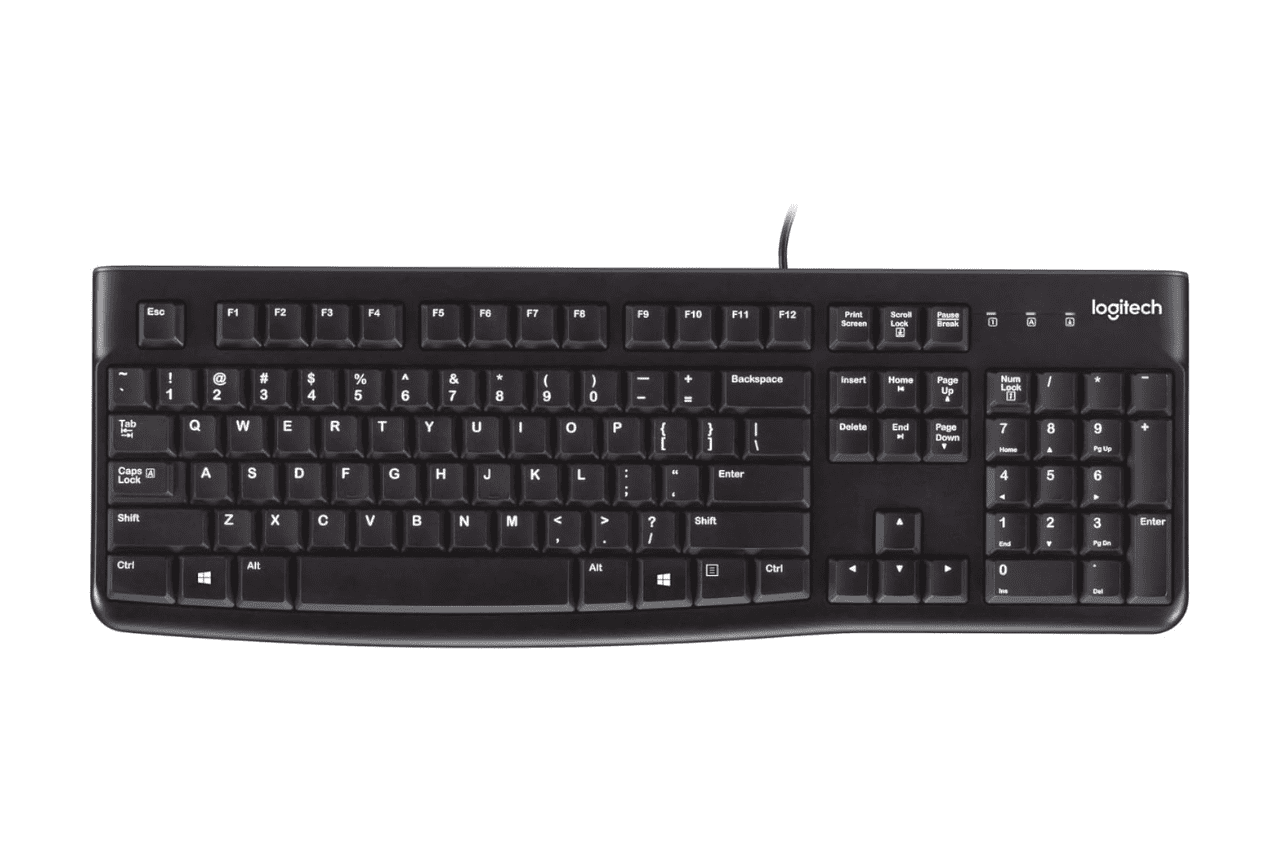
The Logitech K120 is one of the best budget membrane keyboards for office work, a full-size wired USB keyboard that delivers reliable typing comfort, spill-resistant construction, and plug-and-play simplicity right out of the box. It requires zero software, zero configuration, and zero learning curve. For high-volume data entry, shared workspaces, and anyone who values function over flash, it remains a remarkably smart choice in 2026.
In this Logitech K120 keyboard review, you’ll get a grounded look at what makes this no-frills peripheral a staple for millions, and where it falls short.
Key Takeaways
- The Logitech K120 keyboard is one of the best budget membrane keyboards for offices and shared workspaces, offering plug-and-play simplicity with zero software installation or configuration required.
- With a full-size 104-key layout, spill-resistant construction, and 10 million keystroke durability rating, the K120 delivers reliable typing comfort without compromising on everyday performance.
- The keyboard’s quiet membrane switch mechanism (approximately 2.8mm key travel) and low-profile keycaps reduce hand fatigue during long typing sessions, making it ideal for high-volume data entry and all-day office work.
- Unlike wireless alternatives, the K120 wired design draws power directly from USB, eliminating battery concerns and dropout issues while enabling IT departments to deploy dozens of units in minutes.
- Real-world user reports show K120 keyboards lasting 8+ years with fade-resistant UV-coated keycaps and sturdy construction, often outlasting the computers they’re connected to.
The K120 doesn’t try to impress you with RGB lighting or programmable macros. It just works. Logitech designed this keyboard for people who type thousands of words a day and need something that won’t quit, won’t distract, and won’t drain the IT budget.
You plug it in via USB, and you’re typing within seconds. No drivers, no companion apps, no bloatware. That plug-and-play peripheral setup without software is genuinely refreshing in an era where even a mouse wants to install 200MB of proprietary software on your machine. The K120 is compatible with Windows 7 through Windows 11, Chrome OS, and most major Linux distributions, according to Logitech’s official product page.
Whether you’re outfitting a call center with 50 identical stations or just need a backup keyboard that’ll last years in a drawer, the K120 earns its reputation through sheer consistency.
Key Features and Design
Wired Connectivity and Plug-and-Play Setup
The K120 connects through a standard USB-A cable that measures roughly 5.9 feet (1.8 meters). That length gives you real flexibility for desktop placement without needing an extension cable. Because it draws power directly from the USB port, you never deal with dead batteries or wireless dropouts during a critical spreadsheet session.
This is a true plug-and-play device. Your operating system recognizes it instantly, no installation wizard, no restarts. IT departments love this keyboard precisely because deploying it across dozens of machines takes minutes, not hours.
Full-Size Layout and Key Configuration
You get a standard 104-key layout with a dedicated number pad, function row, and navigation cluster. Nothing is shrunk, relocated, or missing. If you do high-volume data entry, that full number pad isn’t optional, it’s essential.
The curved space bar is a subtle but meaningful design detail. It follows the natural arc of your thumbs, reducing the awkward bottom-out impact you feel on flat space bars after hours of typing. The low-profile keys sit close to the keyboard deck, which helps keep your wrists in a more neutral position.
Spill-Resistant Structure
Logitech engineered the K120 with a spill-resistant design that channels liquid through drain holes in the base. This isn’t waterproof, don’t submerge it, but a knocked-over coffee cup won’t necessarily kill it. You tip the keyboard, let it drain, and you’re often back in business.
For shared workspaces and break-room-adjacent desks, this feature alone justifies choosing the K120 over keyboards without any liquid protection. Cleaning and maintaining a membrane keyboard like the K120 is straightforward: pop the keys off gently, wipe down the deck, and reassemble.
Sturdy and Adjustable Tilt Legs
The two fold-out feet on the back let you adjust the typing angle. It’s a simple inclusion, but the legs feel sturdy enough that they won’t snap the first time you apply pressure. The rubber pads on the base prevent sliding on most desk surfaces.
That adjustable tilt helps you find a comfortable angle that reduces wrist strain, especially useful during long typing sessions where even small ergonomic improvements compound over hours.
Typing Comfort and User Experience
Deep-Profile Keys and Typing Feedback
The K120 uses a membrane switch mechanism with a key travel of approximately 2.8mm. That’s a noticeable amount of travel for a membrane board, enough that your fingers register each keystroke without bottoming out harshly. The actuation force sits around 60 grams, which strikes a balance between too light (accidental presses) and too heavy (finger fatigue).
You won’t mistake this for a Cherry MX mechanical switch. But that’s the point. The Logitech K120 typing experience and feel is soft, predictable, and forgiving across thousands of keystrokes per day.
Comfortable Typing for Long Sessions
The low-profile keycap design means your fingers don’t have to reach as far between keys. Over an 8-hour workday, that reduced finger travel adds up. Many users report that the K120 causes less hand fatigue than taller mechanical keyboards that lack a wrist rest.
“Been using a K120 at work for 3 years. No issues. Comfortable for all-day typing and the keys haven’t worn at all.” via r/keyboards
For ergonomic comfort with low-profile keys, pairing the K120 with a decent wrist rest like the Amazon Basics Keyboard Wrist Rest takes the setup from good to great.

Quiet Operation and Typing Noise
This is one of the quietest office keyboards under $20. The membrane mechanism produces a soft, muted sound profile, no clickety-clack that announces your presence across a shared workspace. If you work in an open-plan office or take late-night calls while someone sleeps nearby, the K120’s silent typing profile is a genuine advantage.
It won’t win silence awards against a laptop’s chiclet keyboard, but compared to any mechanical switch? Night and day.
Typing Efficiency and Accuracy
The standard key spacing and familiar layout mean zero adjustment period. You sit down and type at full speed immediately. The keycaps have a slight concave shape that helps center your fingertips, which improves accuracy during fast typing bursts.
For best keyboards for high-volume data entry, the K120’s predictability is its superpower. There are no surprises, just consistent keystrokes, every time.
Durability and Everyday Performance
Durable Build Quality
Logitech rates the K120’s keys for up to 10 million keystrokes. The plastic chassis feels lightweight but not flimsy. It flexes slightly under pressure, a common trait of budget keyboards, but nothing that affects daily use.
The Logitech K120 longevity and build quality consistently surprises people. It’s the kind of keyboard that outlasts the computer it’s plugged into.
“I have K120s from 2015 still going strong in our office. We’ve replaced monitors and mice multiple times but never the K120s.” via r/sysadmin
Fade-Resistant Lettering
Logitech uses UV-coated keycaps that resist fading from heavy use and sunlight exposure. After years of daily typing, the legends on the keys stay readable. This matters in shared environments where keyboards rotate between users and endure constant contact.
Dependability in Office and Home Use
The K120 ships with a 2-year limited hardware warranty from Logitech. But many users report lifespan well beyond that. For IT procurement managers buying in bulk, this translates to very low replacement rates and predictable budgeting.
Here’s a quick feature summary:
- Connection: USB-A wired (5.9 ft cable)
- Layout: Full-size, 104 keys
- Key travel: ~2.8mm
- Spill-resistant: Yes (drain channels)
- Compatibility: Windows, Chrome OS, Linux
- Key life: 10 million keystrokes
- Warranty: 2-year limited
Expert Note: “Membrane keyboards like the K120 don’t suffer from the switch chatter degradation that plagues mechanical boards over time. The rubber dome mechanism provides a more stable actuation curve across the keyboard’s total lifespan, which explains why these units outlast their rated keystroke count so regularly.”
Data Insights and Analysis
According to Logitech’s 2025 sustainability report, the K120 remains one of their highest-volume peripherals globally, with the wired keyboard category seeing steady demand even as wireless models gain share. Market research from Statista indicates the global keyboard market reached approximately $5.9 billion in 2025, with membrane keyboards still commanding over 60% of unit sales in commercial environments.
For a helpful visual overview of the K120, check out this video review:
Comparisons and Alternatives
K120 Wired Keyboard vs K270 Wireless Keyboard
The Logitech K120 vs K270 comparison comes down to one question: do you need wireless freedom or wired reliability? The K270 uses a USB Unifying receiver and runs on AAA batteries, while the K120 draws power from its USB cable and never needs charging or battery swaps.
| Feature | Logitech K120 | Logitech K270 |
|---|---|---|
| Connection | USB-A Wired | 2.4 GHz Wireless |
| Power Source | USB bus-powered | 2x AAA batteries |
| Key type | Membrane | Membrane |
| Number Pad | Yes | Yes |
| Spill Resistant | Yes | No |
| Media Keys | No | Yes (8 hotkeys) |
| Battery Life | N/A | Up to 24 months |
For stationary desk setups, the K120 wins on simplicity and spill resistance. The K270 makes more sense if you need desk mobility or hate cable clutter. If wireless appeals to you, the Logitech K270 is a solid alternative.

How K120 Compares With Other Keyboards
Against budget mechanical options like the Redragon K552, the K120 trades satisfying key clicks for a dramatically quieter typing profile and simpler maintenance. Mechanical keyboards collect more debris between switches and require more effort to clean.
Compared to other budget membrane boards from HP or Dell, the K120 consistently outperforms in key feel and spill resistance. The curved space bar design, UV-coated keycaps, and drain channels aren’t features you typically find at this tier.
The K120 isn’t the flashiest keyboard you’ll ever own. But it’s probably the most dependable. When you need a full-size wired USB keyboard for long-term use that handles coffee spills, aggressive typing, and years of shared abuse without complaint, this is the one. Sometimes the smartest purchase is the boring one.

Frequently Asked Questions
What makes the Logitech K120 keyboard a good budget option for office work?
The Logitech K120 is a full-size wired keyboard with reliable typing comfort, spill-resistant construction, and true plug-and-play simplicity. It requires zero software installation, is compatible with Windows, Chrome OS, and Linux, and delivers consistent performance for high-volume typing without unnecessary features.
Is the Logitech K120 keyboard waterproof or spill-resistant?
The K120 features spill-resistant design with drain holes in the base to channel liquid safely. It’s not waterproof, so don’t submerge it, but a knocked-over coffee cup typically won’t destroy it. Tip the keyboard, let it drain, and it usually continues working.
How long do Logitech K120 keyboards typically last?
Logitech rates the K120 for up to 10 million keystrokes. Many users report lifespans well beyond the 2-year warranty, with some offices still using units from 2015. The durable membrane mechanism and UV-coated keycaps resist degradation from years of daily use.
Does the Logitech K120 require drivers or software to work?
No. The K120 is a true plug-and-play keyboard that requires zero drivers, zero configuration, and zero software installation. Your operating system recognizes it instantly via USB, and you can start typing within seconds of connecting.
What is the difference between the Logitech K120 and K270 keyboard?
The K120 is wired (USB-powered, no batteries) with spill resistance but no media keys. The K270 is wireless (2.4 GHz with AAA batteries, 24-month battery life) and includes 8 media hotkeys but lacks spill resistance. Choose K120 for stationary desks; pick K270 for mobility.
Is the Logitech K120 quiet compared to mechanical keyboards?
Yes. The K120’s membrane switch mechanism produces a soft, muted sound profile, making it one of the quietest office keyboards under $20. It’s significantly quieter than mechanical keyboards, ideal for shared workspaces or late-night use without disturbing others.