
Last updated on April 5th, 2026 at 07:52 am
When your TCL TV stops responding to remote commands, it disrupts your entire viewing experience and leaves you frustrated. Remote control issues affect millions of TCL TV owners and can stem from various technical problems.
Your TCL TV is not responding to the remote due to battery issues, infrared signal obstruction, pairing failures, or malfunctioning IR sensors. The most effective solutions include replacing batteries, power cycling both devices, re-pairing the remote, clearing signal obstructions, and checking for hardware damage.

Reasons Your TCL TV Ignores Remote Commands
Battery depletion represents the most frequent cause of unresponsive TCL TV remotes. Even when batteries appear to have charge remaining, weak power levels can prevent proper infrared signal transmission. TCL remotes require consistent voltage to generate strong IR signals that the TV’s sensor can detect reliably across room distances.
Infrared signal interference creates communication barriers between your remote and TV. Direct sunlight, fluorescent lighting, and other electronics emit infrared radiation that can overwhelm or block your remote’s signals. Additionally, physical obstructions like furniture, decorations, or even dust accumulation on the TV’s IR sensor can prevent signal reception.
Remote pairing failures occur frequently with wireless TCL remotes that use Bluetooth or RF technology instead of traditional infrared. These advanced remotes must maintain active connections with your TV, and connection drops can happen due to interference, distance, or software glitches that require manual re-pairing.
“Modern TCL smart TVs use a combination of infrared and wireless technologies for remote communication, making troubleshooting more complex than traditional IR-only systems.”
Furthermore, hardware malfunctions within either the remote control or TV’s receiver can cause permanent unresponsiveness. Internal component failures, water damage, or physical drops can damage the remote’s infrared LED or the TV’s sensor circuitry, requiring replacement or professional repair.
Software conflicts between your TV’s operating system and remote control firmware can also cause response issues. System updates, app conflicts, or corrupted settings may interfere with the TV’s ability to process remote commands properly, even when the hardware functions correctly.
Immediate Battery and Power Solutions
Begin troubleshooting by replacing remote batteries with fresh, high-quality alkaline batteries. Remove old batteries completely and insert new ones, ensuring correct polarity alignment. Even if old batteries test as functional, weak charge levels often cause intermittent remote response issues that fresh batteries resolve immediately.
Generic batteries often lack the consistent voltage required for wireless pairing. Using a reliable set of Energizer Max AAA Batteries ensures a strong infrared signal that can penetrate through minor obstructions and maintain a stable Bluetooth connection.

Test remote functionality using your smartphone’s camera to verify infrared signal transmission. Point your remote at your phone’s camera and press any button while viewing the camera screen. A working remote will display a bright white or purple light at the remote’s tip, confirming that infrared signals are transmitting properly.
Power cycle your TCL TV by unplugging it from the wall outlet for 30 seconds, then reconnecting power. This process resets the TV’s internal systems, including the infrared receiver and wireless communication modules that process remote commands. Hold the TV’s power button for 15 seconds while unplugged to discharge residual power.
Additionally, remove and reinsert batteries in your remote while the TV is powered off. This sequence can reset the remote’s internal memory and re-establish communication protocols with your TV. After reinserting batteries, power on your TV using the manual power button and test remote functionality.
Check battery contacts for corrosion or dirt buildup that can prevent proper electrical connection. Clean battery terminals with a dry cloth or cotton swab, and ensure batteries fit snugly in their compartments without loose connections that cause intermittent power delivery.
Remote Pairing and Connection Fixes
Re-pair wireless remotes using your TCL TV’s specific pairing procedure. For most TCL Android and Google TV models, press and hold the Home and OK buttons simultaneously for three seconds until the remote’s LED indicator begins flashing. Position the remote close to your TV during pairing to ensure strong signal reception.
Access pairing mode manually when automatic pairing fails. Navigate to your TV’s Settings menu using physical buttons on the TV itself, then go to Remote & Accessories > Add Accessory to initiate pairing mode. Your TV will search for available remotes and display pairing instructions for your specific model.
Reset remote settings by removing batteries for 60 seconds while your TV remains powered on. This extended reset period clears the remote’s stored pairing information and forces it to establish fresh connections with your TV. Insert fresh batteries and immediately attempt pairing while standing within three feet of your TV.
“TCL remotes use different pairing methods depending on the TV model year and platform, so always consult your specific model’s manual for exact procedures.”
Moreover, clear TV’s remote memory through the settings menu to remove corrupted pairing data. Navigate to Settings > Device Preferences > About > Reset > Remote Settings, then restart your TV and attempt fresh remote pairing. This process eliminates conflicting stored connections that prevent new pairing attempts.
Verify remote compatibility by checking your remote’s model number against your TV’s specifications. Some universal or replacement remotes may not support all functions of your specific TCL model, causing partial or complete unresponsiveness that appears to be connection issues.
Use alternative control methods during troubleshooting, such as the TCL mobile app or physical buttons on your TV. These backup control options allow you to access settings and perform reset procedures when your primary remote remains unresponsive.
Infrared Sensor and Signal Troubleshooting
Locate and clean your TV’s IR sensor which typically appears as a small dark window on the front bezel, often near the power indicator light. Use a soft, dry cloth to gently clean the sensor surface, removing dust, fingerprints, or other debris that can block infrared signal reception.
Eliminate signal obstructions by ensuring clear line-of-sight between your remote and TV’s infrared sensor. Remove decorative items, move furniture that blocks the signal path, and ensure you’re pointing the remote directly at the sensor area rather than the screen center.
Test signal range and angle by standing at different distances and positions while operating your remote. IR signals typically work best within 20 feet at angles up to 30 degrees from the sensor. Weak signals may work when you’re closer to the TV but fail at normal viewing distances.
Furthermore, identify environmental interference sources that can disrupt infrared communication. Turn off fluorescent lights, close curtains to block direct sunlight, and temporarily unplug other electronic devices near your TV to test if interference clears when these sources are eliminated.
Check for physical damage to your remote’s infrared LED, located at the tip of the remote. Physical cracks, moisture, or impact damage can prevent proper signal transmission even when batteries provide adequate power. Compare your remote’s LED with a working smartphone camera test to verify signal strength.
Reset infrared receiver sensitivity through your TV’s service menu if available. Some TCL models allow adjustment of IR receiver sensitivity to improve detection of weak signals or reduce false triggering from ambient light sources.
Hardware Replacement and Professional Solutions
Consider replacement remotes when troubleshooting fails to restore functionality. High-quality universal TCL TV remotes offer full compatibility with most TCL models and cost significantly less than manufacturer replacements while providing identical functionality.
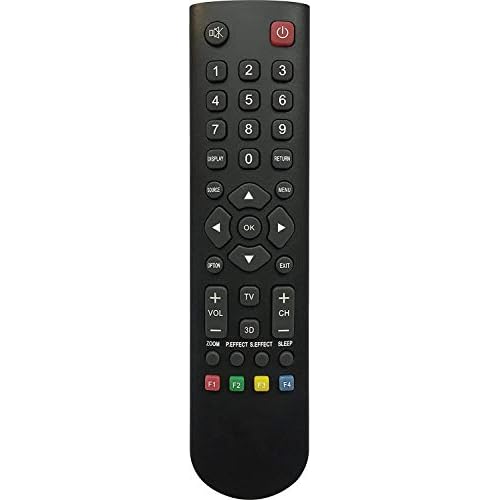
Evaluate internal hardware issues that may require professional diagnosis. If multiple remotes fail to work with your TV, the problem likely lies within the TV’s infrared receiver or internal processing circuits rather than the remote control itself.
Test with borrowed remotes from friends or family who own similar TCL models to isolate whether your remote or TV hardware has failed. This testing helps determine whether purchasing a replacement remote will solve your problem or if TV repair is necessary.
Additionally, explore mobile app alternatives such as the official TCL app or universal remote apps that use WiFi connections instead of infrared signals. These software solutions provide temporary remote functionality while you obtain hardware replacements or schedule professional repairs.
Document warranty coverage before pursuing expensive repairs or replacements. Many TCL TVs include one-year warranties that cover remote control and infrared receiver defects, potentially saving hundreds of dollars on professional service calls or component replacements.
Contact TCL customer support for model-specific troubleshooting assistance and warranty claims. Provide your TV’s exact model number, serial number, and detailed description of troubleshooting steps you’ve already attempted to expedite support resolution.
Advanced Troubleshooting
Perform factory reset procedures when software conflicts prevent remote communication. Access your TV’s reset options through the physical menu buttons or mobile app, then select “Factory Reset” or “Reset to Default Settings.” This process eliminates software conflicts but requires reconfiguring all settings and reinstalling apps.
Update TV firmware to resolve compatibility issues with remote controls. Navigate to Settings > System > System Update and download any available updates. Firmware updates often include fixes for remote communication bugs and improved compatibility with various remote control models.
Check wireless interference if you’re using WiFi-enabled TCL models with voice remotes. Wireless routers, Bluetooth devices, and other smart home equipment can interfere with remote communication on the same frequency bands. Temporarily disable nearby wireless devices to test if interference clears.
Moreover, reset network connections that might affect wireless remote functionality. Navigate to Settings > Network > Network Reset and re-establish your WiFi connection. Some TCL models use network connections for enhanced remote features that can fail when network settings become corrupted.
Access service mode diagnostics if available on your TCL model to test infrared receiver functionality directly. These hidden diagnostic menus can verify whether hardware components function properly and identify specific failure points requiring professional attention.
Implement power management solutions by connecting your TV to a surge protector or UPS system. Power fluctuations and electrical surges can damage sensitive infrared receiver circuits, causing permanent remote control unresponsiveness that requires component replacement.
Here’s a helpful video demonstrating TCL TV remote troubleshooting techniques:
Video Credit: Fix369 / YouTube
Frequently Asked Questions
Why did my TCL remote suddenly stop working after years of use?
Remote controls fail gradually due to component wear, battery corrosion, and accumulated dust inside the device. The infrared LED weakens over time, internal circuits develop micro-fractures from repeated button presses, and moisture infiltration can corrode electrical connections.
Additionally, your TV’s infrared receiver may develop sensitivity issues that require stronger signals than an aging remote can provide. Most remotes last 3-5 years with regular use before requiring replacement, though physical damage or extreme temperatures can accelerate failure.
Can I use any universal remote with my TCL TV?
Most universal remotes work with TCL TVs for basic functions like power, volume, and channel changing, but advanced features may not function properly. Smart TV functions, voice control, and app-specific buttons often require manufacturer-specific remotes or certified compatible replacements.
Check the universal remote’s compatibility list for your exact TCL model number before purchasing. Some universal remotes require programming codes that may not include all TCL models, particularly newer smart TV variants with specialized features.
What should I do if my TCL TV won’t respond to any remote?
When multiple remotes fail to control your TV, the problem likely lies within the TV’s infrared receiver or internal processing circuits. Try using physical buttons on the TV itself to verify that the TV functions normally through manual controls.
Download the TCL mobile app as a temporary remote solution, then contact TCL customer support for warranty assessment. If the TV is out of warranty, professional repair may cost more than replacement depending on your model’s age and value.
How do I know if my remote’s infrared LED is working?
Use your smartphone’s camera to test infrared transmission by pointing your remote at the camera lens and pressing any button. Working remotes display a bright white or purple light at the remote’s tip when viewed through the camera. If no light appears despite fresh batteries, the infrared LED has failed and requires remote replacement.
This test works because smartphone cameras can detect infrared light that human eyes cannot see, providing reliable verification of remote signal transmission.
Why does my TCL remote work intermittently or only from close range?
Intermittent remote function typically indicates weak battery power, dirty battery contacts, or failing infrared components. Replace batteries with fresh alkaline cells and clean battery terminals with a dry cloth to eliminate power delivery issues.
If problems persist with new batteries, the remote’s infrared LED is likely weakening and requires replacement. Environmental factors like bright lights or signal obstructions can also reduce effective range, so test from different positions and lighting conditions to identify contributing factors.
Sources:
- TCL Support – Android TV Remote Not Working
- TCL Support – Roku TV Remote Troubleshooting
- AirBeamTV – TCL Roku TV Remote Fixes
- Roku Community – Remote IR Issues Discussion