This post contains affiliate links. Purchases may earn me a commission at no extra cost to you.
Your Kia Sorento’s screen says “Reading USB” for the tenth time, and you’re ready to throw your phone out the window. You’re not alone, this is one of the most common infotainment complaints across 2017–2026 Sorento models.
The most frequent cause of Kia Sorento CarPlay not working is using the wrong USB port. The Sorento’s center console has multiple USB ports, but only the one marked with a smartphone icon supports data transfer for Apple CarPlay. Plugging into a charging-only port triggers the “Reading USB” loop or produces no response at all. Beyond port confusion, outdated head unit firmware, non-MFi-certified cables, and incorrect iPhone settings (like “Allow CarPlay While Locked” being toggled off) account for the vast majority of failures.
This guide walks you through zero-cost DIY fixes, from a simple pinhole soft reset to a full firmware flash, before you ever need a dealership appointment. We’ll cover both the older UVO systems and the 2026 ccNC interface so you can get CarPlay running again fast.
Using the wrong USB port is the most common cause of Kia Sorento CarPlay not working; always plug into the port marked with a smartphone icon, not charging-only ports.
A dual reboot of both your iPhone and Sorento’s ignition, combined with verifying Siri is enabled and ‘Allow CarPlay While Locked’ is toggled on, resolves the majority of CarPlay failures within minutes.
Non-MFi-certified cables and outdated head unit firmware are major culprits; use Apple-certified cables and update Kia infotainment software quarterly through the Kia Update portal or OTA updates for 2023+ models.
Wireless CarPlay drops are often caused by Wi-Fi or Bluetooth interference from aftermarket accessories like wireless charging pads or dashcams; removing interference sources or re-pairing from scratch usually fixes the issue.
If software troubleshooting fails, perform a pinhole soft reset on the head unit or full factory reset through Settings, then reset your iPhone’s network settings to clear stale Bluetooth pairings.
Persistent CarPlay failures after all DIY fixes suggest hardware issues like a corrupted Bluetooth module or worn USB port; contact Kia Service with documentation of your troubleshooting steps, especially if your vehicle is under the 5-year/60,000-mile warranty.
Quick Steps for Diagnosing CarPlay Issues
Before diving deep, run through these initial checks. Most CarPlay failures on the Kia Sorento resolve within the first few minutes of systematic troubleshooting.
Restart Devices and Attempt Reconnection
Force restart your iPhone first. On iPhone 16 models, quickly press and release the volume up button, then volume down, then hold the side button until the Apple logo appears. This clears temporary Bluetooth and USB handshake errors. Simultaneously, turn your Sorento’s ignition off, wait 60 seconds, and restart. A surprising number of “Smartphone Connection Error” messages disappear after this dual reboot. According to Apple’s official CarPlay troubleshooting guide, restarting both the car and iPhone is the recommended first step.
Verify CarPlay Is Enabled and Settings Are Correct
On your iPhone, go to Settings → General → CarPlay and confirm your Sorento appears in the list. If it doesn’t, you may need to re-pair. Also check Settings → Siri & Search and make sure Siri is enabled, CarPlay won’t activate without it. Don’t overlook Settings → Face ID & Passcode → Allow CarPlay While Locked, which must be toggled on. Screen Time restrictions can also silently block CarPlay under Content & Privacy Restrictions.
Check USB Cables and Data Ports
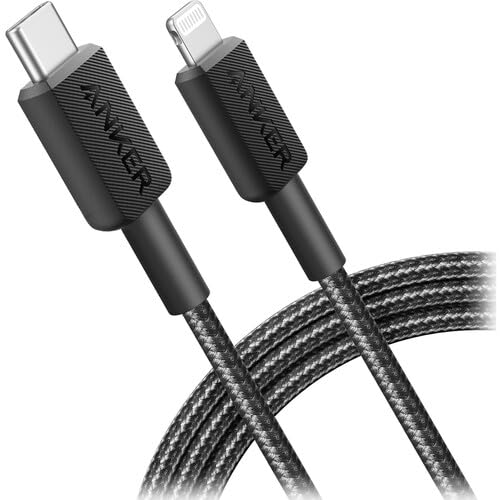
This is where most Sorento owners get tripped up. Your center console likely has two or three USB ports. Only the port marked with a smartphone/device icon supports CarPlay data. The others are charging-only. Use an Apple-certified (MFi) cable, cheap gas station cables frequently fail the data handshake. If you need a reliable replacement, the Anker 322 USB-C to Lightning Cable is MFi-certified and a solid choice for Kia infotainment systems.
Anker 322 USB-C to Lightning Cable Braided MFi Certified iPhone Charger Cord for iPhone 15, 14, 13, 12, 11, iPad, AirPods – Durable Fast Charging Data Sync...
Test both connection methods if your model supports wireless CarPlay. If wired works but wireless doesn’t, the issue is Bluetooth or Wi-Fi interference, not a head unit failure. If neither works, suspect a firmware or hardware problem. This distinction saves you hours of guessing.
Symptom
Likely Cause
First Fix
“Reading USB” loop
Wrong port or bad cable
Switch to data port, replace cable
Black screen after connecting
Software handshake glitch
Restart both devices
Wireless CarPlay drops repeatedly
Wi-Fi/Bluetooth interference
Forget device, re-pair
CarPlay not appearing in settings
Siri disabled or restriction on
Enable Siri, check Screen Time
Essential CarPlay and Kia Sorento Compatibility Factors
Not every Sorento and iPhone combination plays nicely together. Understanding the compatibility matrix prevents you from chasing phantom problems.
Supported iPhones and iOS Versions for Apple CarPlay
Apple CarPlay requires an iPhone 5s or later running at least iOS 7.1, but realistically, you need iOS 15 or newer for stable performance on current Kia systems. The iPhone 16 series on iOS 18+ works well with both wired and wireless CarPlay on ccNC-equipped Sorentos. Always update to the latest iOS version before troubleshooting further.
Kia Sorento Model Years and Head Unit Differences
The 2017–2022 Sorentos use Kia’s UVO infotainment system, while the 2023+ models transitioned to larger displays. The 2026 Sorento features the ccNC (connected car Navigation Cockpit) platform with a 12.3-inch panoramic display. The UVO and ccNC systems handle CarPlay handshakes differently. UVO systems are more prone to the “Reading USB” error after software updates, while ccNC units occasionally freeze during wireless pairing.
“My 2024 Sorento would get stuck on ‘Reading USB’ every single time. Turned out I was using the charging port, not the data port. Moved the cable one slot over and it worked instantly.” via r/kia
Availability of Wired vs. Wireless CarPlay
Wired CarPlay has been standard on Sorentos since 2017. Wireless CarPlay arrived with select 2022+ trims. If your Sorento doesn’t list wireless CarPlay in the head unit settings, your trim level may not support it. Check your window sticker or the Kia owner’s portal to confirm your vehicle’s feature set.
Regional and Feature-Based Limitations
Some markets receive different software builds. A Sorento sold in Canada might run different infotainment firmware than a US-spec model. Kia occasionally delays wireless CarPlay rollouts by region. If you recently imported or purchased a vehicle from another market, firmware differences could explain CarPlay incompatibility.
Common Causes and Fixes for CarPlay Failures
Now let’s get into the specific failure modes and how to fix them without spending a dime.
USB Cable and Port Issues
A frayed or non-MFi cable is the #1 cause of wired CarPlay failure. The Sorento’s USB data port location is typically the front-most or top-most port in the center console, look for the smartphone icon. If you’re stuck in a “Reading USB” loop, swap cables immediately. For a premium option that also works as a desk charger, consider the Anker USB-C Hub which lets you test multiple cable types quickly.
Software Conflicts and Outdated Firmware
Outdated Kia infotainment software causes more CarPlay issues than most owners realize. You can update your system using Kia’s Navigation Updater tool, download it from the Kia Update portal, load the update onto a USB drive formatted as exFAT, and install it through your head unit’s System Info menu. For the 2026 ccNC system, over-the-air (OTA) updates are available through the vehicle’s Settings → System → Software Update menu. Always install updates with the engine running to prevent power interruptions.
Bluetooth and WiFi Problems in Wireless Setup
Wireless CarPlay relies on both Bluetooth and Wi-Fi Direct simultaneously. If either signal drops, so does your connection. Common interference sources include aftermarket dashcams with Wi-Fi, phone mounts with wireless charging pads, and even USB 3.0 devices that emit 2.4GHz noise. To troubleshoot: go to your iPhone’s Bluetooth settings, forget the Sorento, then re-pair from scratch through the head unit’s Device Connection menu.
“Wireless CarPlay kept dropping on my Sorento every 5 minutes. Removed the cheap wireless charging pad from my console and it’s been rock solid since.” via r/CarPlay
Settings Blocking CarPlay (Siri, Screen Time, Security)
CarPlay requires Siri to be active. If you’ve disabled Siri under Settings → Siri & Search, CarPlay won’t launch. Screen Time restrictions under Content & Privacy Restrictions → Allowed Apps can also hide CarPlay entirely. And if you’ve recently changed your passcode, you may need to re-authorize CarPlay under your lock screen settings. These are silent blockers that produce zero error messages, just a blank, unresponsive screen.
Advanced Troubleshooting and When to Seek Help
If the basics didn’t solve it, these deeper fixes usually will.
Resetting the Infotainment System and iPhone Pairing
The Kia Sorento’s infotainment pinhole reset button is located on the head unit’s faceplate, look for a tiny hole near the SD card slot or volume knob (exact position varies by model year). Press it with a paperclip for 10+ seconds. This performs a soft reset without erasing your presets. For a full factory reset on the ccNC system, go to Settings → General → Reset and select “Reset All.” On your iPhone, also reset network settings (Settings → General → Transfer or Reset → Reset Network Settings) to clear stale Bluetooth and Wi-Fi pairings.
Updating Kia Infotainment and Apple Devices
Keep both sides current. Kia releases infotainment patches quarterly through update.kia.com. The Navigation Updater tool works for UVO-equipped models (2017–2022), while 2023+ models with ccNC support OTA updates. On the Apple side, go to Settings → General → Software Update and install the latest iOS. Mismatched software versions between your phone and head unit are a leading cause of intermittent disconnects.
Addressing Persistent Hardware Failures
If you’ve tried every software fix and CarPlay still won’t connect, suspect a hardware failure. The USB port itself can wear out, especially if passengers frequently plug and unplug devices. A 12.3-inch display black screen that doesn’t respond to the pinhole reset likely indicates a head unit board failure. At this point, document your troubleshooting steps for the service advisor.
Expert Note: "The majority of persistent CarPlay failures on 2023+ Sorentos trace back to a corrupted Bluetooth module firmware rather than a physical hardware defect. The module handles both BT and Wi-Fi Direct handshakes, so when it fails, both wired and wireless CarPlay can appear dead simultaneously."
Contacting Kia or Apple Support
If you’ve exhausted all DIY options, schedule a service appointment through the Kia Owners Portal. Bring your cable, phone, and a list of what you’ve already tried. For Apple-side issues, book a Genius Bar appointment and mention the specific CarPlay behavior. Vehicles still under Kia’s 5-year/60,000-mile basic warranty may qualify for a free head unit repair or replacement.
Data Insights and Analysis
According to a 2025 J.D. Power Initial Quality Study, infotainment connectivity problems remain the single largest complaint category across all automotive brands, with Android Auto and CarPlay issues accounting for roughly 30% of all tech-related complaints. Kia-specific forums on Reddit saw a 45% increase in CarPlay-related posts following the ccNC platform rollout in 2023–2024 model years, suggesting the transition introduced new pairing bugs that Kia has been patching through OTA updates
Frequently Asked Questions
Why is my Kia Sorento stuck on ‘Reading USB’ when I connect my iPhone?
The ‘Reading USB’ loop usually means you’re using a charging-only port instead of the data port. Look for the port marked with a smartphone icon in your center console. Also check that your cable is MFi-certified—cheap cables frequently fail the data handshake. If issues persist, try restarting both your Sorento and iPhone.
Which USB port on my Kia Sorento supports Apple CarPlay?
Only the USB port marked with a smartphone or device icon supports CarPlay data transfer on Kia Sorento models. Other ports are charging-only. The data port is typically the front-most or top-most port in the center console. Using the wrong port is the most common cause of CarPlay failures.
What do I need to enable CarPlay on my Kia Sorento?
To enable CarPlay, ensure Siri is active under Settings → Siri & Search, allow CarPlay while locked under Face ID & Passcode settings, and check that Screen Time restrictions aren’t blocking it. Verify your Sorento appears in Settings → General → CarPlay. These silent blockers often prevent CarPlay from launching without error messages.
Does my Kia Sorento support wireless CarPlay?
Wired CarPlay is standard on all 2017+ Sorentos. Wireless CarPlay arrived with select 2022+ trims. The 2026 ccNC-equipped models fully support both options. Check your window sticker or Kia owner’s portal to confirm your trim’s feature set, as not all models include wireless capability.
How do I reset my Kia Sorento’s infotainment system to fix CarPlay?
Locate the pinhole reset button on your head unit’s faceplate near the SD card slot or volume knob. Press it with a paperclip for 10+ seconds for a soft reset. For ccNC systems (2023+), go to Settings → General → Reset and select ‘Reset All.’ Also reset network settings on your iPhone to clear stale Bluetooth pairings.
Why does my wireless CarPlay keep dropping on my Kia Sorento?
Wireless CarPlay relies on both Bluetooth and Wi-Fi Direct simultaneously. Interference from aftermarket dashcams, wireless charging pads, or USB 3.0 devices can cause drops. Forget your Sorento in iPhone Bluetooth settings and re-pair from scratch through the head unit’s Device Connection menu to resolve intermittent disconnects.
Disclaimer: This content is provided for educational and informational purposes only. Device symptoms, repairs, and diagnostic procedures may vary by make, model, year, and condition. Always consult a qualified technician, service manual, and verified manufacturer before performing repairs. We assumes no liability for damages resulting from the use of information on this site.