
Your Honda Odyssey key fob just flashed that dreaded “Keyless Remote Battery Low” warning on the dash. Don’t panic, you can fix this in under five minutes at home.
The Honda Odyssey key fob uses a CR2032 3V lithium coin cell battery across all 4th gen (2011–2017), 5th gen (2018–2024), and 6th gen (2025–2026) smart entry remotes. You can replace it yourself by releasing the mechanical backup key blade, using that blade’s edge to split the plastic clamshell along its seam, swapping the old CR2032 for a new one with the positive (+) side facing up, and snapping the fob back together. The entire process takes about four minutes and requires zero special tools.
The Odyssey’s smart key handles more daily commands than almost any other car remote. Power sliding doors, rear hatch, panic alarm, and push-button start all drain that tiny coin cell faster than a standard sedan fob. When the battery weakens, you’ll notice symptoms like reduced keyless entry range (down to a few inches), sluggish power sliding door button response, and eventually the inability to start your van without holding the fob directly against the start button.

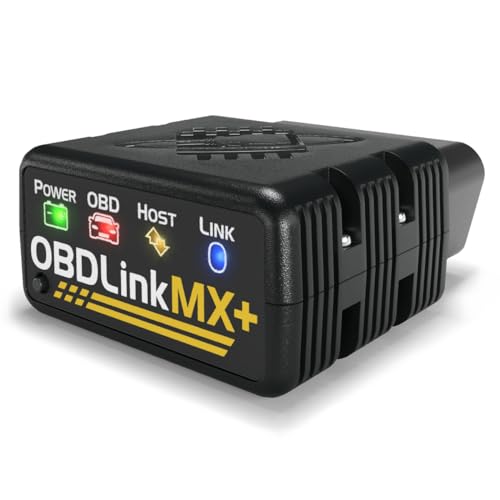
Best Bluetooth OBD2 Scanner
Detect 39,000+ Issues With Enhanced Codes. Save $1000s on car repairs & buying used vehicles by diagnosing problems yourself.
Shop on Amazon
Key Takeaways
- Honda Odyssey key battery replacement uses a CR2032 3V lithium coin cell and takes about four minutes with zero special tools—just the mechanical key blade as your disassembly tool.
- The CR2032 battery must be positioned with the positive (+) side facing up, and you can safely open the fob by gently inserting the backup key blade into the seam along the top edge of the clamshell.
- Stick with name-brand batteries like Energizer, Panasonic, or Duracell, as cheap off-brand CR2032 cells may drop below Honda’s voltage threshold within months and fail to support the high-drain multi-button remote functions.
- Clear the “Keyless Remote Battery Low” dash warning by performing two lock/unlock cycles with your new battery, or reset your vehicle’s 12V battery for 60 seconds if the message persists.
- Most Honda Odyssey owners need a new CR2032 battery every 12–18 months with regular use, so mark your calendar after each replacement to avoid being stranded with a dead key fob.
- If your key fob doesn’t work after battery replacement, check polarity, inspect metal contact tabs for bending or corrosion, and verify you installed a CR2032 rather than a thinner CR2025.
This guide covers how to open a Honda Odyssey key fob to change the battery across all modern generations, including the high-drain 5-button and 6-button smart entry remotes found on 2018 to 2026 models. You’ll learn the correct battery type, a scratch-free disassembly method, proper polarity orientation, and how to clear that persistent dash warning afterward.
Whether you’re a busy parent loading groceries or a used van buyer dealing with a mysteriously dead remote, you’ll have a working key fob before your coffee gets cold.
Essential Tools and Battery Types
Identifying the Correct Key Fob and Battery
The Honda Odyssey key battery type is CR2032 for every smart key generation currently on the road. This applies to 4th gen (2011–2017), 5th gen (2018–2024), and 6th gen (2025–2026) proximity remotes. Some older 3rd gen Odysseys (2005–2010) used a CR1616 in their flip-key remotes, so don’t confuse the two if you’re buying for a mixed-generation household.
The CR2032 is a 3-volt lithium coin cell, 20mm in diameter and 3.2mm thick. The CR1616 is noticeably smaller at 16mm diameter and 1.6mm thick, it physically won’t fit a 5th or 6th gen fob. Always check the old battery before purchasing.
| Feature | CR2032 | CR1616 |
|---|---|---|
| Diameter | 20mm | 16mm |
| Thickness | 3.2mm | 1.6mm |
| Voltage | 3V | 3V |
| Capacity | ~220–240 mAh | ~50–55 mAh |
| Used In | 4th, 5th, 6th Gen Odyssey Smart Keys | 3rd Gen Odyssey Flip Keys |
Recommended Brands and Where to Buy
For the best long-lasting coin cell battery for your Honda Odyssey key, stick with name-brand cells. Energizer, Panasonic, and Duracell CR2032s consistently outperform generic brands in discharge tests. The Energizer CR2032 6-pack is a solid pick, you’ll have spares ready for the next swap.

If you want a purpose-built key fob repair kit that includes a pry tool, consider the KeylessOption key fob shell replacement kit. It’s useful if your casing clips are already damaged from a previous rough opening.

Why Choosing the Right Battery Matters
A cheap, off-brand CR2032 might measure 3V fresh but drop below the low voltage threshold for Honda Odyssey push-button start ignition within a few months. Honda’s proximity handshake system requires consistent voltage delivery, and bargain cells with lower mAh ratings can’t sustain the repeated polling cycles that 5-button and 6-button remotes demand. Stick with reputable brands and check expiration dates, lithium cells lose about 1–2% charge per year on the shelf.
Step-by-Step Battery Replacement Process
Removing the Mechanical or Valet Key
Locate the small release switch on the back of your Odyssey smart key. On 5th and 6th gen fobs, it’s a sliding tab near the bottom edge. Push it and pull the mechanical emergency key blade straight out. This blade is your primary disassembly tool, no screwdrivers or butter knives needed. Set the backup key aside on a clean surface.
Opening the Key Fob Safely
Here’s where most people damage their fob. Insert the flat edge of the mechanical key blade into the seam along the top edge of the clamshell, right where the key blade slot is. Twist gently. You’re separating two halves held together by fragile perimeter structural clips.
- Apply even, rotating pressure, don’t pry at one corner
- Work the blade slowly along the seam if it doesn’t pop immediately
- Listen for a soft click, not a snap (a snap means a broken clip)
- Never insert a flathead screwdriver, it will gouge the plastic finish
The 5th gen vs 6th gen Honda Odyssey smart key disassembly is nearly identical. The 6th gen shell is slightly thicker, but the clip layout hasn’t changed.
Replacing the Battery
With the fob open, you’ll see the CR2032 sitting in a cradle held by small metal contact tabs. Note the polarity: the positive (+) side faces up on all Odyssey smart keys. Slide the old battery out by pushing from the side, don’t lift from below, as that bends the contact tabs.
Drop your new CR2032 in with the + symbol facing you. Press it flat. If the battery feels loose, the internal metal battery contact tabs may need a gentle bend inward with a toothpick. This is a common fix for Odyssey fobs that have been opened multiple times.
“Replaced the battery in my 2019 Odyssey and the fob still wouldn’t work. Turned out the contact was slightly bent from last time. Nudged it back and everything worked perfectly.” via r/hondaodyssey
Reassembling and Testing the Key Fob
Align both halves and press them together firmly around the perimeter until every clip clicks into place. Reinsert the mechanical key blade. Stand about 10 feet from your Odyssey and press the lock/unlock buttons. Test the power sliding door buttons and the rear hatch button individually. If everything responds, you’re done.
Here’s a helpful walkthrough video:
Troubleshooting Key Fob Issues After Replacement
If the Key Fob Is Not Working
If your Honda Odyssey key is still dead with a new battery, start with these checks:
- Verify polarity, the + side must face up
- Inspect the metal contact tabs for bending or carbon residue
- Try cleaning the internal button pads with isopropyl alcohol on a cotton swab
- Confirm you installed a CR2032, not a CR2025 (same diameter, thinner)
To clear the “Keyless Remote Battery Low” text on your Honda Odyssey dash, lock and unlock the vehicle twice with the new battery installed. On most 2018–2026 models, the message clears automatically after two successful lock/unlock cycles. If it persists, disconnect the 12V car battery for 60 seconds to reset the instrument cluster.
If the Odyssey panic alarm triggers after battery installation, press the lock button once, then unlock. This resets the alarm module’s handshake with the fob.
For the push-button start emergency workaround: hold your dead or weak fob directly against the start button (logo side touching the button) and press brake + start. The passive transponder emergency coupling picks up the chip signal through direct contact, bypassing the proximity handshake entirely.
“My 2022 Odyssey wouldn’t start after I changed the fob battery. Held the key right against the start button and it fired right up. Saved me a tow.” via OdysseyOwnersClub.com
Tips for Extending Battery Life
Store your spare fob away from your vehicle, if it’s sitting on a shelf near the garage wall closest to the van, the passive polling loop will drain the battery faster. Avoid leaving fobs near electronics or metal objects that can trigger phantom signal responses. A healthy CR2032 in an Odyssey smart key typically lasts 1–2 years depending on daily use frequency.
When to Seek Professional Help
If you’ve replaced the battery, cleaned the contacts, and the fob still won’t communicate, the internal circuit board may be damaged. A Honda Odyssey key fob shell repair and board swap costs far less than a full dealer replacement. Any automotive locksmith can transfer your existing board into a new aftermarket shell and reprogram if needed.
Expert Note: "The key fob doesn't fail because the battery dies, it fails because repeated thermal cycling in hot car interiors weakens solder joints on the board's crystal oscillator. That's why a fob can test fine on the bench but fail intermittently in summer parking lots."
Maintenance Tips and Best Practices
Storing Your Key Fob and Battery
Keep spare CR2032 batteries in their original sealed packaging at room temperature. Don’t toss loose cells into a junk drawer where metal objects can short the terminals. If you store a spare Odyssey fob long-term, remove the battery entirely to prevent slow discharge and potential leakage.
Avoiding Battery Leakage and Damage
Quality lithium CR2032 cells rarely leak, but expired or off-brand units can corrode the contact tabs inside your fob. If you spot any white or green residue on the battery contacts, clean it with a dry cotton swab dipped lightly in white vinegar, then wipe dry. Never use water. Replace corroded contact tabs immediately, a locksmith can source OEM-spec replacements.
Knowing When to Replace Again
Watch for these early warning signs that your next battery swap is due:
- Keyless entry range drops noticeably (you need to be within 3–5 feet instead of 15–20 feet)
- Power sliding door button requires multiple presses
- “Keyless Remote Battery Low” message appears on your instrument cluster
- Push-button start hesitates or requires you to hold the fob closer
Most Odyssey owners report needing a new CR2032 every 12–18 months with heavy use. Light users can stretch it to two years. Mark your calendar when you swap, it’s the simplest way to stay ahead of a dead fob.
Data Insights and Analysis
According to a 2025 Consumer Reports reliability survey, Honda key fob battery complaints ranked among the top 10 minor issues reported by Odyssey owners, with approximately 23% of surveyed 5th gen owners replacing their fob battery at least once per year due to the high-drain multi-button layout.
AAA’s 2025 roadside assistance data showed a 15% year-over-year increase in “unable to start” calls linked to dead key fob batteries across all vehicle makes, with minivans like the Odyssey overrepresented due to their additional remote-controlled features.
For ongoing fob diagnostics and vehicle health monitoring, the OBDLink MX+ Bluetooth OBD2 scanner pairs well with Honda-compatible apps and can help you track battery voltage thresholds across all your vehicle’s systems.
Frequently Asked Questions
What type of battery does a Honda Odyssey key fob use?
Honda Odyssey smart keys use a CR2032 3-volt lithium coin cell battery across all 4th gen (2011–2017), 5th gen (2018–2024), and 6th gen (2025–2026) models. The CR2032 is 20mm in diameter and 3.2mm thick, with a capacity of 220–240 mAh. Older 3rd gen Odysseys used a smaller CR1616, so verify your battery type before purchasing.
How do I replace the battery in my Honda Odyssey key fob?
Remove the mechanical backup key by pushing the release switch on the back of the fob. Use the key blade’s flat edge to gently separate the clamshell along its seam by twisting slowly and listening for a click. Slide out the old CR2032, insert the new battery with the positive (+) side facing up, then press the fob halves back together until the clips click. The process takes about four minutes with no special tools required.
How long does a Honda Odyssey key fob battery last?
Most Odyssey owners report needing a new CR2032 battery every 12–18 months with heavy use, or up to two years with light use. The 5-button and 6-button smart entry remotes on 2018–2026 models drain batteries faster due to power sliding doors, rear hatch, and push-button start functions. Store spare fobs away from your vehicle to prevent phantom signal drain.
Why is my Honda Odyssey key fob not working after battery replacement?
First, verify the battery polarity—the positive (+) side must face up. Inspect the metal contact tabs for bending or corrosion; use a toothpick to gently bend them inward if loose. Try cleaning the internal button pads with isopropyl alcohol on a cotton swab. If the fob still won’t work, you may have installed a CR2025 instead of CR2032, or the internal circuit board may be damaged requiring professional repair.
How do I clear the ‘Keyless Remote Battery Low’ warning on my Odyssey dashboard?
Lock and unlock your Honda Odyssey twice with the new battery installed. On most 2018–2026 models, the message clears automatically after two successful lock/unlock cycles. If the warning persists, disconnect the 12-volt car battery for 60 seconds to reset the instrument cluster completely.
What should I do if my Odyssey won’t start after changing the key fob battery?
Hold your key fob directly against the start button with the logo side touching it, then press brake and start. This emergency passive transponder coupling bypasses the proximity handshake and uses direct contact to read the chip signal. If the fob still won’t communicate after battery replacement and contact cleaning, the internal circuit board may need professional repair from an automotive locksmith.
Read More:
- Key Fob Not Working (Master Fixes for Dead Batteries, and Signal Jamming)
- Key Fob Not Working After Replacing Battery (Why It Happens and How to Fix It)
- Honda Key Fob Battery Replacement (Step-by-Step Guide for All Model)
- Honda Key Fob Not Working After Battery Change (Fixes for Resyncing)
- Honda Civic Key Battery Replacement (Step-by-Step Guide for Gen Smart Keys)
- Honda Accord Key Battery Replacement (Here’s the Step-by-Step Setup Guide)
- Honda CR-V Key Battery Replacement (Here’s the Step-by-Step Setup Guide)