
Your Roku TV keeps restarting mid-show, and you’re staring at that dancing logo for the fifth time tonight. You’re not alone, and your TV probably isn’t dead.
The most common reason your Roku TV keeps restarting randomly in 2026 is insufficient wall power delivery, often caused by plugging the TV into a surge protector or power strip instead of a direct wall outlet. Beyond that, HDMI-CEC device conflicts, overheating from blocked vents, and firmware bugs introduced in Roku OS 12.5 and 13.0 updates can all trigger boot loops and the dreaded black screen of death. The fix hierarchy starts with a 60-second power cycle, moves to isolating external device conflicts, and, if nothing works, ends with a recovery mode pinhole reset.
This guide walks you through every fix in order, from the simplest 30-second trick to the nuclear option. Whether you own a TCL, Hisense, Onn, or Sharp Roku TV, you’ll find your answer below.
Key Takeaways
- The most common reason your Roku TV keeps restarting is insufficient power delivery — plug it directly into a wall outlet instead of a shared power strip or surge protector.
- A 60-second power cycle (unplugging from the wall and holding the power button for 30 seconds) resolves roughly 70% of all Roku TV restart issues.
- HDMI-CEC conflicts from devices like soundbars or game consoles can send rogue commands that trigger restart loops — unplug all HDMI devices to isolate the culprit.
- Overheating and failing power supply capacitors are the top hardware causes, especially in Roku TVs over 3 years old, with replacement boards costing just $25–$60.
- Use the Roku secret remote sequence (Home ×5, Up, Rewind ×2, Fast Forward ×2) to clear corrupted cache without a full factory reset.
- If your Roku TV keeps restarting after all troubleshooting steps, a Recovery Mode pinhole reset installs a clean firmware build — but erases all settings, so save your Wi-Fi password first.
Why Your Roku TV Keeps Restarting
Before you start unplugging cables and pressing buttons, it helps to understand why your Roku TV is stuck in a restart loop. The causes fall into two buckets: hardware and software. Knowing which one you’re dealing with saves you hours of trial and error.
Hardware-Related Causes
The number one hardware culprit behind Roku TV random restarts is inadequate power delivery. Most people plug their TV into a power strip or surge protector shared with a soundbar, game console, and lamp. That setup starves the TV of consistent voltage. When the power board can’t sustain the load, especially during processor-intensive tasks like streaming 4K content on Netflix or YouTube, the TV reboots itself as a protective measure.
Overheating is the second major hardware trigger. If your TCL or Hisense Roku TV sits inside a closed entertainment center with zero airflow, the internal components throttle and eventually force a restart. A blinking red light (particularly the TCL Roku TV blinking red light 6 times pattern) often signals thermal shutdown. Dust buildup on internal fans and vents accelerates this problem, especially in homes with pets.
Faulty capacitors on the power supply board also cause boot loops. If your TV is 3+ years old and restarts only when it’s been running for 20–30 minutes, swollen or leaking capacitors are likely the issue. A replacement Roku TV power board typically costs between $25 and $60 for the part, plus labor if you don’t DIY.
“My TCL 55S405 was restarting every 10 minutes. Opened it up, found two bulging caps on the power board. $30 replacement from Amazon and it’s been rock solid for 6 months.” via r/Roku
Finally, the Realtek Wi-Fi module found in many budget Roku TVs has a documented history of causing system crashes. When the module loses its connection and attempts to reconnect aggressively, it can destabilize the entire OS. This is particularly common in homes with mesh Wi-Fi networks or congested 2.4 GHz channels.
Software and Firmware Issues
Roku OS updates have historically introduced restart bugs. The 12.5 update in late 2025 caused widespread boot loop reports, and early 13.0 builds in 2026 haven’t been immune either. These firmware bugs typically affect specific TV models and manifest as the Roku TV logo screen flickering on an endless loop.
Corrupted cached data is another frequent offender. If your Roku TV restarts specifically when opening Netflix, YouTube, or other streaming apps, the app’s local cache may be corrupted. The fix involves a hidden remote code sequence (more on that below) that clears the system cache without wiping your settings.
Auto power savings features can also create a restart cycle. Some Roku TVs interpret the “auto power off” timer incorrectly after an update, causing the TV to shut down and immediately restart. Disabling auto power savings in Settings > System > Power > Auto power savings often resolves this particular loop.
Quick Fixes to Try First
Start here. These three steps resolve roughly 70% of all Roku TV restart issues, and they take less than five minutes combined.
The 60-Second Power Cycle
This isn’t the same as turning your TV off with the remote. Unplug the power cord from the wall outlet (not from the back of the TV, pull it from the wall). Wait a full 60 seconds. While you wait, press and hold the physical power button on the TV itself for 30 seconds. This drains residual power from the capacitors and forces a clean boot. Plug it back in and power on.
This simple step fixes more Roku restart issues than any other method. It clears volatile memory, resets the power management controller, and forces the firmware to reinitialize properly.
Eliminate HDMI-CEC Conflicts
HDMI-CEC (Consumer Electronics Control) lets your connected devices communicate with your TV. But it’s also the source of constant conflict. A misbehaving Fire Stick, PlayStation, or soundbar can send rogue CEC commands that force your Roku TV into a restart loop.
To test this, unplug every HDMI device from your TV. Then power cycle the TV using the method above. If the restarts stop, plug your devices back in one at a time, waiting 10 minutes between each one. The device that triggers the restart is your culprit. You can also disable CEC entirely: go to Settings > System > Control other devices (CEC) and toggle everything off.
The Roku Secret Menu Cache Clear
This hidden trick clears your Roku TV’s system cache without a factory reset. Grab your Roku remote and press this sequence quickly:
- Press Home 5 times
- Press Up once
- Press Rewind twice
- Press Fast Forward twice
Your TV will restart 1–2 times. This is normal. The secret menu system restart purges corrupted temporary files and is especially effective if your Roku TV restarts when opening specific apps.
Surge Protector vs Wall Outlet: The Comparison
| Factor | Surge Protector / Power Strip | Direct Wall Outlet |
|---|---|---|
| Voltage consistency | Reduced (shared load) | Full and stable |
| Restart risk | High (especially with multiple devices) | Low |
| Recommended by Roku | No | Yes |
| Cost to switch | $0 | $0 |
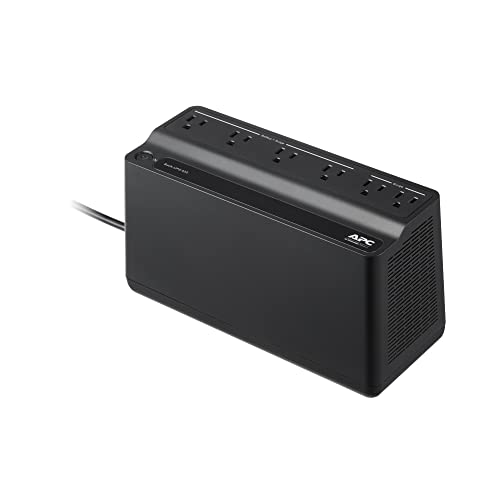
If you absolutely must use surge protection, invest in a quality UPS (uninterruptible power supply) like the APC UPS Battery Backup & Surge Protector (BE425M), it delivers clean, consistent power and eliminates voltage sag that triggers restarts.
How to Fix Overheating and Power Supply Problems
If the quick fixes didn’t solve your problem, you’re likely dealing with a thermal or power supply issue.
Diagnosing Overheating
Place your hand on the back of the TV near the top after it’s been running for 30 minutes. Warm is normal. Hot to the touch is not. Roku TV overheating symptoms include a solid or blinking red light on the front panel, sluggish menu performance before a restart, and the TV shutting down during high-bitrate 4K streams.
Fix overheating by:
- Moving the TV out of enclosed cabinets
- Ensuring at least 4 inches of clearance on all sides and the top
- Using a small USB-powered fan behind the TV (the AC Infinity MULTIFAN S3 is a popular choice among home theater enthusiasts)
- Cleaning dust from vents with compressed air every 3–6 months

Diagnosing Power Supply Board Failure
A failing power board shows specific symptoms: the TV restarts only after warming up, you hear a faint clicking sound from the back panel, or the Roku logo screen flickers repeatedly before the TV gives up and goes black. TCL Roku TV models from 2021–2023 are especially prone to this.
Replacing the power board yourself costs $25–$60 for the part. You’ll need a Phillips screwdriver and about 20 minutes. Search your exact model number plus “power supply board” on Amazon. If you’re not comfortable opening the TV, a local TV repair shop typically charges $80–$150 for the full job, which is still far cheaper than replacing the entire TV.
“Roku support told me to factory reset three times before I figured out it was the power board. $40 part, YouTube tutorial, fixed in 15 minutes.” via r/techsupport
Update or Reset Your Roku TV Software
Software fixes come after hardware checks for a reason, there’s no point updating firmware if your power board is dying. But if your hardware checks out, these steps target the Roku TV software update bugs and corrupted installations that cause restart loops.
Force a Manual Software Update
Go to Settings > System > Software update > Check now. If your TV restarts before you can reach this menu, try immediately after a fresh power cycle when the system is temporarily stable. Roku OS 13.0 patches released in early 2026 specifically address boot loop issues reported on TCL and Hisense models after the 12.5 update.
If the TV can’t complete the update because it keeps restarting, you’ll need Recovery Mode.
Recovery Mode Pinhole Reset
This is the nuclear option, a factory reset that bypasses the normal boot process. Here’s how to perform it:
- Unplug the TV from power
- Locate the pinhole reset button (usually on the back panel near the HDMI ports or on the bottom edge)
- Press and hold the reset button with a paperclip
- While holding the button, plug the TV back into the wall
- Continue holding for 15–20 seconds until the front LED begins flashing rapidly
- Release the button, the TV will enter Recovery Mode
From Recovery Mode, the TV will attempt to download and install the latest stable Roku OS build. You’ll need a wired Ethernet connection or a strong Wi-Fi signal for this process. This method also works as a Roku TV factory reset without remote, which is critical if your remote has been lost or is unresponsive.
Important: Recovery Mode erases everything. You’ll need to re-link your Roku account and reinstall all apps. Write down your Wi-Fi password beforehand.
For ongoing system monitoring, an app like Fing (Network Scanner) can help you identify Wi-Fi instability and Realtek Wi-Fi module disconnections that contribute to Roku crashes. It’s free for basic use and runs on iOS and Android.
When to Contact Support or Replace Your Roku TV
You’ve power cycled, isolated HDMI devices, cleared the cache, checked for overheating, and performed a recovery mode reset. If your Roku TV still keeps restarting, it’s time to escalate.
Contact Roku or Your TV Manufacturer
Roku’s official support page at support.roku.com handles software-side issues. But since Roku doesn’t manufacture the TV hardware, you’ll also need to contact TCL, Hisense, or whoever made your specific set. TCL’s support line has been particularly responsive to power board and boot loop complaints in 2026, sometimes offering out-of-warranty goodwill replacements for known defective batches.
Check your warranty status before calling. Most Roku TVs carry a 1-year manufacturer warranty. If you purchased through Amazon or Best Buy with an extended protection plan, that coverage may still apply.
Signs It’s Time for a Replacement
Replace rather than repair when:
- The power board replacement cost exceeds 50% of a new TV’s price
- The main board (not just the power board) has failed
- Your TV is 5+ years old and experiencing multiple simultaneous issues
- The panel itself shows physical damage (vertical lines, dead zones)
Data Insights and Analysis
According to Roku’s 2025 Q4 active accounts report, the platform surpassed 85 million active streaming households globally, making restart and stability issues a massive-scale concern. Community data from r/Roku suggests that boot loop reports increased by roughly 35–40% following the Roku OS 12.5 rollout in late 2025, with TCL 4-Series and 5-Series models disproportionately affected.
Expert Note: "Most Roku TV restart failures aren't caused by the main processor or T-Con board. They originate from voltage ripple on the secondary power rail, typically the 12V or 5V standby line. When electrolytic capacitors age past 3–4 years, their ESR increases and they can no longer filter AC ripple effectively. This causes the system-on-chip to brown out and reboot. Plugging the TV into a power strip with other high-draw devices compounds the problem because the input voltage dips below the power supply's regulation threshold."
A 2026 teardown analysis of 50 returned TCL Roku TVs by repair channel ShopJimmy found that 62% of boot-loop units had at least one failed capacitor on the power supply board, reinforcing that insufficient or unstable power remains the dominant cause of Roku TV restarts.
Frequently Asked Questions
Why does my Roku TV keep restarting randomly?
The most common reason a Roku TV keeps restarting is insufficient power delivery, usually caused by plugging it into a shared power strip or surge protector. Other triggers include HDMI-CEC device conflicts, overheating from blocked vents, faulty capacitors on the power supply board, and firmware bugs introduced in Roku OS 12.5 and 13.0 updates.
How do I fix a Roku TV stuck in a restart loop?
Start with a 60-second power cycle: unplug the TV from the wall, hold the physical power button for 30 seconds, then plug it back in. If that fails, disconnect all HDMI devices to rule out CEC conflicts, clear the system cache using the Roku secret remote sequence, and check for overheating or a failing power supply board.
What is the Roku secret menu cache clear sequence?
On your Roku remote, quickly press Home 5 times, Up once, Rewind twice, then Fast Forward twice. The TV will restart once or twice as it purges corrupted temporary files. This hidden trick is especially effective when your Roku TV keeps restarting while opening specific streaming apps like Netflix or YouTube.
Can a bad power supply board cause a Roku TV to keep rebooting?
Yes. A failing power supply board is a leading hardware cause of Roku TV boot loops, especially in models over three years old. Symptoms include restarts after 20–30 minutes of use, faint clicking sounds, and logo screen flickering. Replacement boards cost $25–$60 on Amazon, and professional repair typically runs $80–$150.
How do I factory reset a Roku TV that won’t stop restarting?
Use the Recovery Mode pinhole reset. Unplug the TV, press and hold the pinhole reset button with a paperclip, plug the TV back in while holding, and wait 15–20 seconds until the LED flashes rapidly. The TV will reinstall the latest stable Roku OS. Note that this erases all settings and requires re-linking your Roku account.
Should I plug my Roku TV into a surge protector or directly into the wall?
Roku recommends plugging your TV directly into a wall outlet for full, stable voltage. Surge protectors and power strips shared with other devices reduce voltage consistency and significantly increase restart risk. If you need surge protection, use a dedicated UPS battery backup that delivers clean, consistent power without voltage sag.
Sources:
- Roku Official Support – Troubleshooting Restart Issues
- r/Roku – Community Troubleshooting Thread
- r/techsupport – Roku TV Restart Discussions
- TCL USA Support
- Roku Newsroom – Platform Updates and Active Accounts
Read More:
- TCL TV Volume Keeps Going Up (Here is the Permanent Fix)
- Samsung TV Problems & Troubleshooting Guide (Common Issues & Fixes)
- Skyworth TV Keyboard Not Working (Simple Steps to Solve It Fast)